How to Check Server Status in Dota 2


When you get disconnected from the server in Dota 2, one of two messages appears at the top of the screen: “Connected to Dota 2, logging in…” or “Searching for Dota 2 network…”. At the same time, you can no longer view your match history or inventory, and the search button stops working. This is a clear sign of issues with Valve’s servers. You can check and fix this using the methods listed below.
Steam Status
Steam Status is a specialized and widely used service that allows you to monitor server status not only for Dota 2, but also for Counter-Strike 2, Team Fortress 2, and Deadlock. Therefore, if Dota 2 gets stuck in an endless server search, follow these steps:
- Open steamstat.us, find the “Dota 2 API” line at the bottom, and check the status on the right.
- If the servers are working normally, it will say “Normal” (in green).
- If there’s an issue, the status will be “Critical” or “Very Slow” (in yellow).
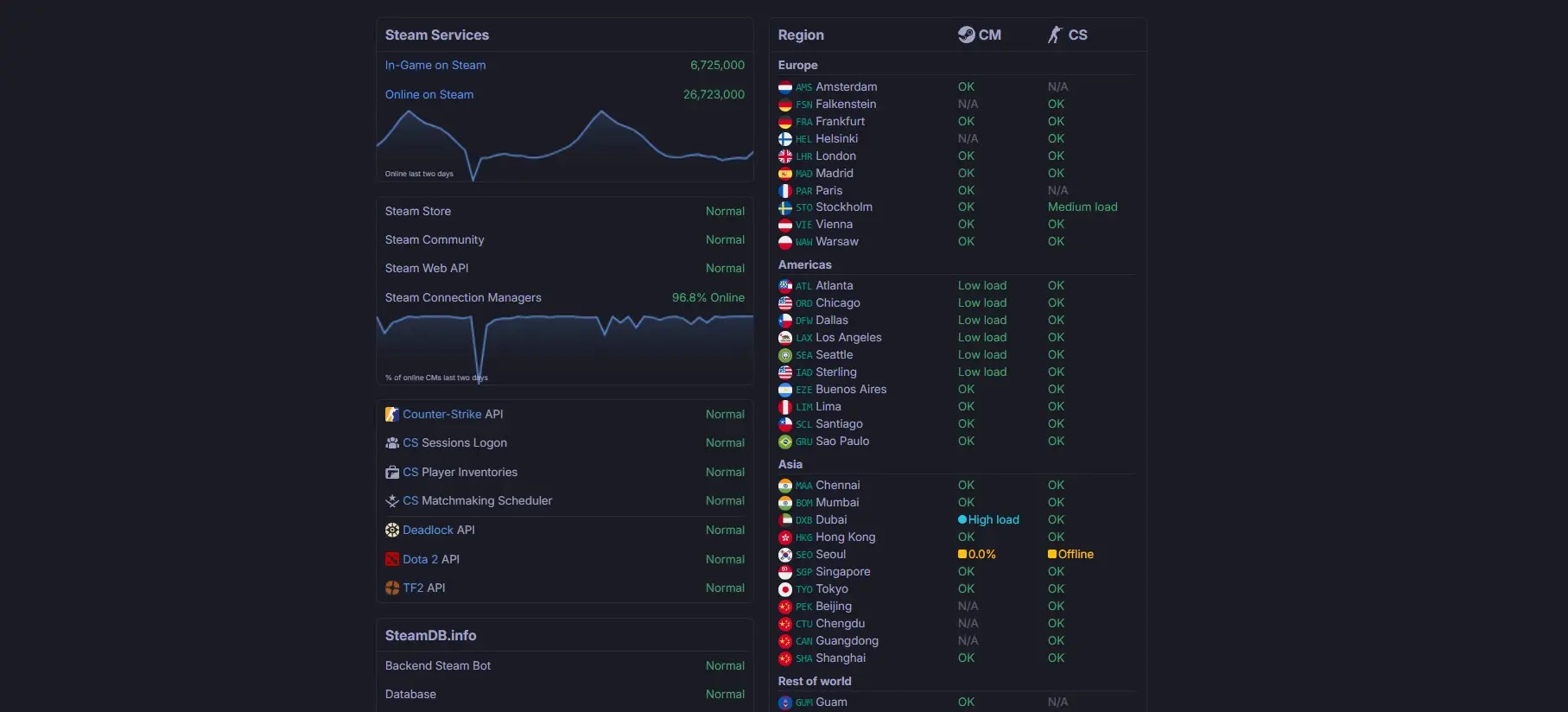
Additionally, on the right side of the window, you can check the status for specific regions. Statuses may vary depending on server load, but if your region shows “OK” or “Low load” and the Dota 2 servers are still not working, the problem may be related to your internet service provider, laptop, or PC.
One option when problems arise is to check the Dota 2 thread on Reddit, where posts related to the game’s status start appearing frequently during outages. However, you can only confirm whether other users are experiencing the same issues when there are major server-wide problems, not local ones. On the other hand, developers sometimes check the thread, so in rare cases, you might find out when the Dota 2 servers will be fixed.
General Tips
If Dota 2 isn’t searching for servers, but the statuses are all fine, and there are no relevant posts on Reddit, the problem is most likely on your end. The following steps can usually help:
- Turn off your VPN—people often forget to disable it, and it can run in the background and degrade connection quality, including during Steam calls.
- Restart your computer or laptop—this will restart OS drivers and services that may have started malfunctioning.
- Verify the integrity of the game files; if the Dota 2 servers aren’t working, this will help restore any corrupted data.
- Close any background programs that might be affecting the stability of your internet connection.
The Most Common Server Errors
If the general tips don’t help, it makes sense to try specific solutions. These depend entirely on the specific error or even the message that appears when a server issue occurs. Here’s the list:
Remote server not responding to requests — solution
- Open Dota 2 “Properties” → “Additional Content” → disable Dota 2 Reborn beta → enable Vulkan.
- An alternative option is to add the following command to the launch options: -novid -high -vulkan -prewarm -map dota -threads 0 +r_overlap_scaleform 0.
- Launch Dota 2 → check the server connection status at the top (if there’s no error, everything is fine).
Unable to connect to the server—solution
- Right-click the Dota 2 icon in your library → open “Properties.”
- Go to the “Installed Files” section → on the right, locate the “Verify Game Files” button.
- Click it → wait for the check to finish → check if the game has connected to the server.
Endless server search in custom games — solution
This is one of the few issues for which there’s no solution within the user’s control. Custom game servers don’t work when their creators encounter problems, and they’re entirely dependent on Valve and its actions. Therefore, the only option is to wait for the servers to come back online.
Also, due to a recent update, matches sometimes start on the users’ end, so if you have a low-spec PC or an unstable internet connection, you won’t be able to start a match from your end.
Dota 2 has disconnected from the server—solution
There are usually two reasons: first, a Dota update has been released (in which case, simply exit the game and download it); second, your internet connection is disrupted (the network is down, there’s a power outage, or there are issues on the ISP’s end).
The matchmaker isn’t responding in Dota 2 — solution
This problem occurs when there are issues on Valve’s end. For example, the servers may be overloaded or something may have malfunctioned after an update was released. In this case, we recommend checking the Dota 2 status by region.
Frequently Asked Questions (FAQ)
Перейдите в «Свойства» Dota 2, откройте «Дополнительный контент», отключите Dota 2 Reborn beta и включите там же Vulkan. Другой вариант — прописать в параметрах запуска команду «-novid -high -vulkan -prewarm -map dota -threads 0 +r_overlap_scaleform 0» (без кавычек).
Проверьте целостность файлов игры: нажмите правой кнопкой мыши по иконке Dota 2 в библиотеке, перейдите в «Свойства», затем в «Установленные файлы» и запустите проверку целостности.
Чаще всего универсального совета в такой ситуации нет. Необходимо дождаться, пока создатели кастомок сами исправят текущие проблемы кастомных режимов. При условии, что такое возможно (многое зависит от Valve).
В Dota 2 на поиск сервера в кастомках нельзя повлиять, а с недавних пор, если свободных выделенных серверов не хватает, запуск режима осуществляется на компьютере одного из участников матча.
Они расположены в Стокгольме, Швеция. На данный момент у Valve нет собственных дата-центров на территории России.