Ping in League of Legends: How to Reduce Latency and Check Your Ping


Ping in League of Legends indicates the delay in data transmission between your computer and the game server. The lower this number, the faster the game responds to your commands. In this article, we’ll explain how to enable ping display in League of Legends, what’s considered a normal ping, and what to do if you experience high latency.
What Is Ping in League of Legends
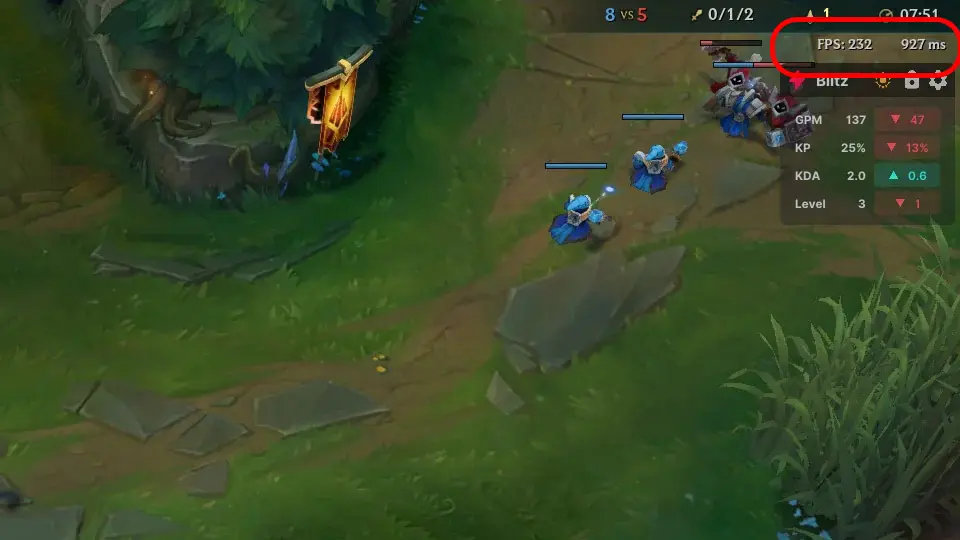
Ping is measured in milliseconds (ms) and indicates the time it takes for data to travel to the Riot Games server and back. For a smooth gaming experience, a ping of up to 50 ms is ideal; values between 50 and 80 ms are considered normal, and latency exceeding 100 ms can cause stuttering, ability delays, and control issues. This is especially critical for ranked play—not all champions are suited for high-latency matches.
How to Enable Ping in League of Legends
During a match, press Ctrl + F. A performance counter will appear on the screen, displaying your current FPS and ping. To hide it, press Ctrl + F again. You can also enable this display through the settings.
If the built-in counter isn’t enough, you can use third-party performance monitoring software. The most popular options are MSI Afterburner with RivaTuner Statistics Server, the NVIDIA App (for NVIDIA graphics cards), AMD Software: Adrenalin Edition (for AMD graphics cards), as well as the Xbox Game Bar, which is built into Windows. With these tools, you can view your FPS, ping, CPU and GPU usage, component temperatures, and other metrics right in the middle of a game.
How to Reduce High Ping
If your ping is consistently high, try connecting to the internet via an Ethernet cable instead of Wi-Fi, close any programs using the network, pause any downloads, and restart your router. If the problem occurs only in League of Legends, check the status of Riot Games’ servers and make sure you aren’t using any IP-changing or proxy programs that might be affecting your connection.
Frequently Asked Questions (FAQ)
Для комфортной игры рекомендуется пинг до 50 мс, хотя значения до 80 мс обычно тоже не создают серьёзных проблем.
Во время матча нажмите Ctrl + F. Также можно воспользоваться сторонними программами.
Причиной могут быть проблемы с интернетом, высокая нагрузка на сеть, Wi-Fi или временные неполадки на серверах Riot Games.
Нет. FPS отвечает за плавность изображения, а пинг — за задержку соединения с сервером.
Да. Помогают проводное подключение к интернету, закрытие фоновых загрузок и выбор ближайшего игрового сервера.