Why Brawl Stars Isn’t Working and What to Do

Brawl Stars may fail to launch for various reasons: from internet issues and an outdated app version to server maintenance. For players in Russia and Belarus, there’s another important factor—Supercell’s regional restrictions.
First, you need to figure out exactly what’s happening: does the game crash immediately, get stuck loading, display a login error, or stop working when using your usual VPN or DNS? Let’s take a look at why Brawl Stars isn’t working and what you can do in each case.
Why Brawl Stars Isn’t Working
The most common causes can be divided into several groups.
- Regional restrictions. In March 2022, Supercell removed its games from app stores in Russia and Belarus and announced that new downloads would no longer be available; therefore, a message stating that you cannot log in from your current location is not a typical technical client error.
- Internet issues. Unstable Wi-Fi, a weak mobile signal, or a brief connection drop can prevent the game from connecting to the server or loading a match.
- VPN or DNS is no longer working. If Brawl Stars used to launch via a specific service but then suddenly stopped, the problem may lie with that service. The VPN server may become unavailable, or the DNS method you’re using may no longer provide the necessary connection.
- Outdated game version. After a major update is released, the old client can no longer connect to the servers. In this case, Brawl Stars usually prompts you to install the new version.
- Server-side issues. Sometimes the problem lies not with the player but with Brawl Stars itself. During maintenance or a widespread outage, the game may take a long time to connect, display an error, or prevent you from joining a match.
- Your smartphone can’t handle the game. According to Supercell’s current requirements for Android, you need Android 7.0 or higher, at least 1 GB of RAM, and a screen resolution of 800×480 or higher. For iPhone, iOS 14 or newer and at least 1 GB of RAM are required. Even meeting these requirements does not guarantee perfectly stable performance on every device.
- Client error. Corrupted files, a failed update, or a temporary bug can cause the game to crash or freeze during loading.
What to Do If Brawl Stars Won’t Launch
First, determine at which stage the problem occurs. This will determine what exactly you should check.
If Brawl Stars freezes during loading or while connecting, start by checking your internet connection. Switch from Wi-Fi to your mobile data network, or vice versa. If the game starts working after switching connections, the issue is most likely with your current network or your internet service provider. Next, completely close Brawl Stars and reopen it. If that doesn’t help, restart your smartphone. If you’re using home Wi-Fi, you can also restart your router.
If you see a message about access restrictions, for users in Russia or Belarus this is due to Supercell’s regional policy, not a problem with your phone. The company announced back in 2022 that it would remove its games from Russian and Belarusian app stores, and starting April 25, 2023, users began receiving a message stating that they could not log in from their current location. In this case, simply restarting the app won’t solve the problem. Players use third-party connection methods, including VPNs and special DNS configurations, but their effectiveness may vary over time.
If Brawl Stars stops working through a VPN, first try a different server within the same service. The farther away the selected country is, the higher the latency may be, so it’s best to start with the closest available regions. If none of the servers work, temporarily disable the VPN and check if the error message changes. Sometimes the problem isn’t with Brawl Stars, but with a specific VPN service or its routing.
If your DNS stops working, don’t rush to change your phone’s entire configuration. First, check if the internet works without that configuration. If other websites and apps open normally, but Brawl Stars no longer launches via your usual DNS, the connection method itself may have temporarily stopped working. The DNS services that players use to access Brawl Stars are not an official Supercell solution, so their consistent operation cannot be guaranteed.
If the game requires an update, install the latest version of the client. On an iPhone, this may require a foreign Apple ID, since Brawl Stars is not available in the Russian App Store. On Android, it’s also important to make sure you have the latest version of the app installed. If the update is already installed but the game started crashing afterward, check your device’s free storage space and operating system version. Older smartphones may become unstable after major updates.
If the game keeps crashing, Supercell recommends reinstalling it as a last resort when other methods haven’t worked. Before uninstalling, be sure to save your progress via Supercell ID.
What to Do If Brawl Stars Displays an Error
First, pay attention to the message text. The same word, “error,” can mean completely different issues.
- If the message mentions your current location or a login restriction, the cause is most likely related to regional access.
- If the game reports a connection issue, check your Wi-Fi or mobile data, turn your VPN or DNS off and on again, and restart the app.
- If the error appeared immediately after an update, check whether you have the latest version of Brawl Stars installed and whether there is enough free space on your smartphone.
- If the app closes immediately without a message, the problem may be related to the client itself or your device’s performance. Supercell notes that the game may also run erratically on devices with a modified operating system or custom firmware.
Don’t rush to uninstall Brawl Stars after the first error. It’s usually safer to first restart the game and your device, check your network connection and for updates, and only then proceed with a reinstallation.
How to Tell If the Problem Is on the Brawl Stars Servers
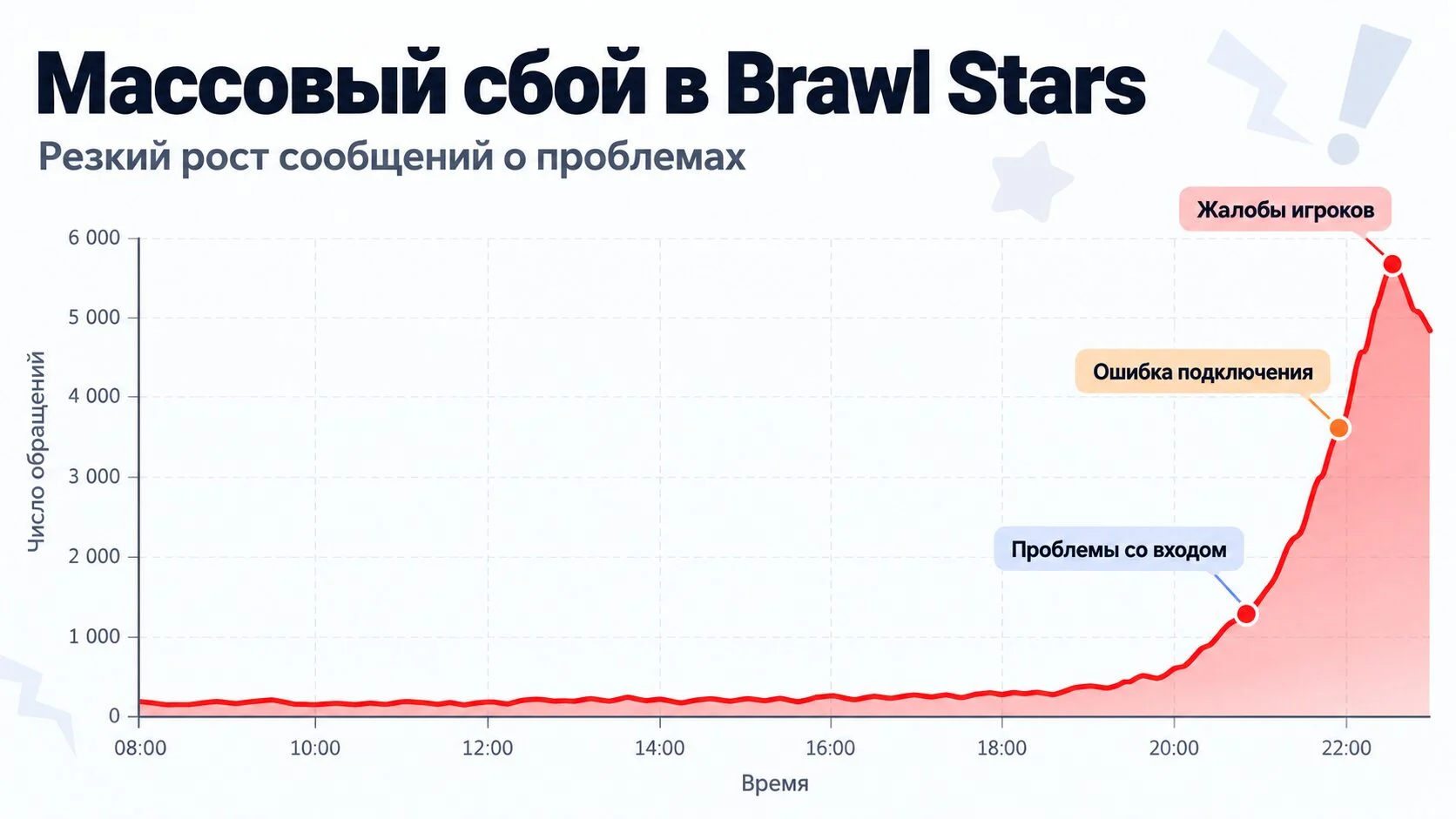
Not every error can be fixed on your smartphone. Brawl Stars uses servers in different regions around the world and usually connects players to the nearest suitable one. In some cases, the system may redirect the user to a different region—for example, if a suitable match takes a long time to find or if the player is in a group with friends from another part of the world.
There are several signs that may indicate a problem with the game itself:
- Brawl Stars suddenly stopped working even though your internet connection is fine;
- The same error occurs whether using Wi-Fi or a mobile network;
- the game won’t launch for several friends at once;
- there are widespread complaints about connectivity;
- Supercell is performing maintenance;
- the app opens, but matches won’t start or the connection to the server keeps dropping.
In this situation, don’t immediately uninstall the game, change your DNS settings, or reset your smartphone. If the outage is widespread, it’s impossible to restore the server on your own—you’ll just have to wait for the developers to fix the problem. You can check the status on Brawl Stars’ official channels and Supercell’s pages. During major maintenance, the developers usually post updates about issues and fixes.
If the error persists for a long time and there are no similar complaints from other players, you can contact Brawl Stars support. The official Supercell website has a separate section for technical issues and a feedback form.
Frequently Asked Questions (FAQ)
Supercell ещё в марте 2022 года удалила свои игры из российских и белорусских магазинов приложений. С 25 апреля 2023 года доступ к Brawl Stars из России и Беларуси также был ограничен, поэтому при обычном подключении может появляться сообщение о невозможности войти из текущего местоположения.
Причиной может быть конкретный сервер VPN, нестабильное соединение или блокировка самого сервиса. Попробуйте другой сервер, затем сравните результат без VPN. Если проблема массовая, она также может находиться на стороне Brawl Stars.
Смените Wi-Fi на мобильный интернет или наоборот, перезапустите приложение и смартфон, а затем проверьте наличие обновлений. Если проблема появилась одновременно у большого числа игроков, возможно, произошёл серверный сбой.
Причиной может быть неполностью установленное обновление, нехватка свободного места, несовместимость устройства или ошибка самого клиента. Проверьте актуальность версии игры и системные требования.
Только в последнюю очередь. Supercell рекомендует переустановку при постоянных вылетах, когда остальные способы уже не помогли. Перед удалением обязательно убедитесь, что аккаунт привязан к Supercell ID, чтобы не потерять прогресс.