How to check your phone’s specs: Android, iPhone, tablets


You can check your smartphone’s specs using the built-in tools on Android or iPhone, as well as with special apps. This lets you find out the device model, processor, RAM and internal storage capacity, battery capacity, operating system version, and other specifications. In this guide, we’ll cover all the methods—both built-in and third-party.
How to Check Your Phone’s Specifications on Android
This method works for Android phones and tablets.
Open “Settings” from the drop-down menu at the top, then go to the “About Phone” or “About Device” section. Tap “Details.”

On some smartphones, some specifications can be found under “Storage,” “Battery,” or “Software Information.”
How to Check iPhone Specifications
The process is virtually the same on iPhones and iPads:
- Open “Settings.”
- Go to the “General” section.
- Select “About This Device.”
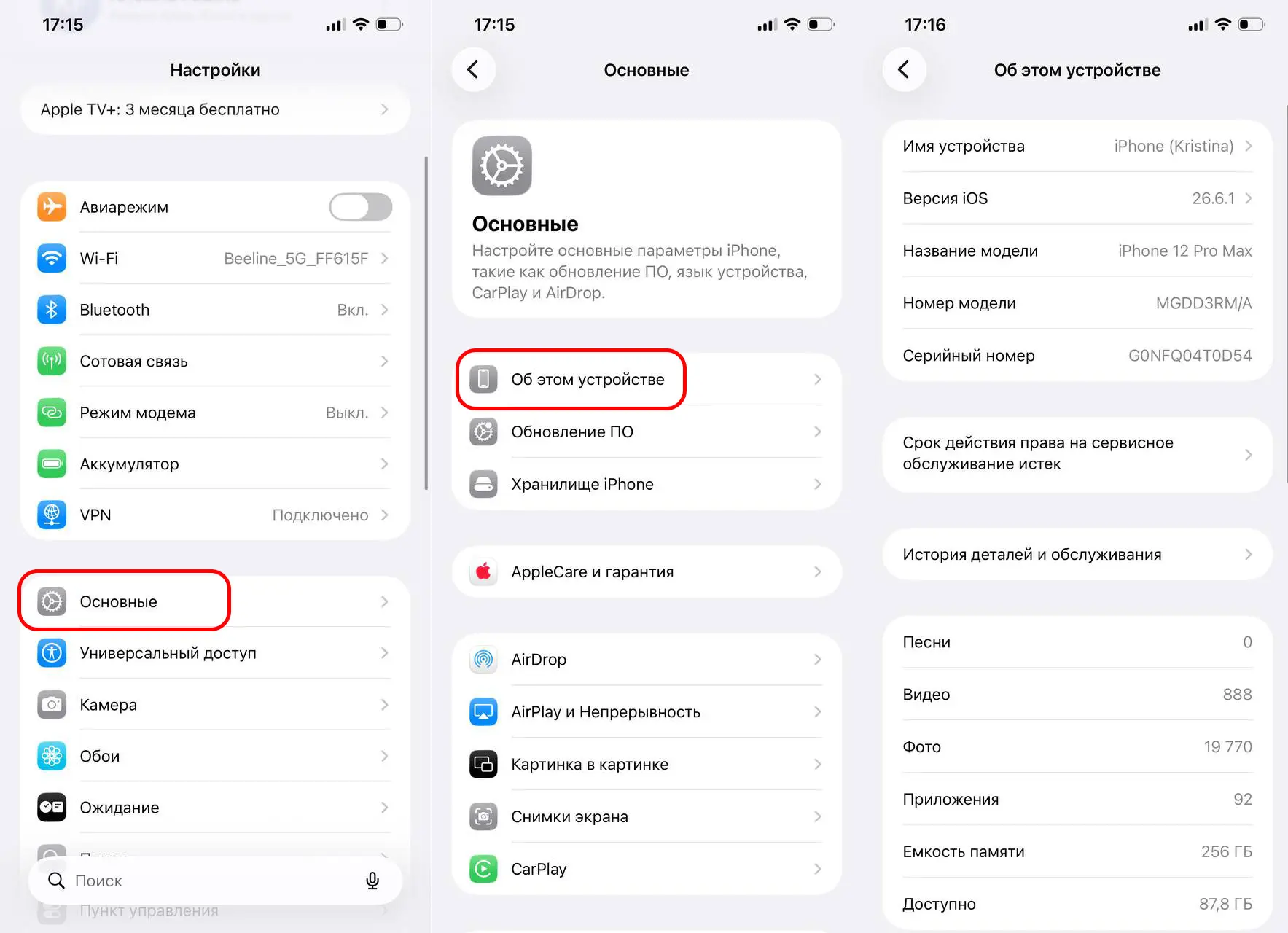
However, this method doesn’t show the processor name or the amount of RAM. If you need more detailed specifications for a specific model, you can enter the serial number on Apple’s official website or look up the device model online.
How to Find a Phone’s Specifications Using the Serial Number
On iPhones and iPads, simply open the “Settings” app, go to “General,” open the “About” tab, and copy the serial number. Then enter it on Apple’s coverage check page—the service will identify the device model, the purchase date (if available), and confirm the smartphone’s authenticity.
For most Android smartphones, there is no single service for checking by serial number. Manufacturers usually provide their own pages for checking warranty status or device information.
The Best Apps for Viewing Phone Specifications
AIDA64
Displays virtually all of a smartphone’s specifications: processor, screen, battery, sensors, cameras, memory, and operating system. Available on Google Play and the App Store.
CPU-Z
Lets you find out the processor model, number of cores, RAM capacity, battery specifications, and basic device information. Available on Google Play and the App Store.
DevCheck
Displays real-time information about the processor, graphics processor, memory, battery, sensors, and system status. Available on Google Play.
Device Info HW
Provides detailed specifications for all smartphone components, including the display, cameras, processor, memory, and supported sensors. Available on Google Play.
Frequently Asked Questions (FAQ)
Откройте «Настройки» — «О телефоне» или «Об устройстве». Там отображаются основные сведения о смартфоне.
Перейдите в «Настройки» — «Основные» — «Об этом устройстве».
Да, серийный номер айфона можно проверить через официальный сервис Apple. Для Android такая возможность зависит от производителя.
Самые популярные: AIDA64, CPU-Z, DevCheck и Device Info HW.
Эти данные можно посмотреть в настройках устройства или с помощью приложений AIDA64, CPU-Z и Device Info HW.