How to change your region and language in Rocket League


In Rocket League, you can select your server region and change the interface language. These settings work independently: selecting English does not switch you to U.S. servers, and selecting Europe does not change the game’s language. Here’s how to change your region in Rocket League and enable Russian or English.
How to Change Your Region in Rocket League
For casual and ranked matches, you select the region in the match search menu:
- In the main menu, click “Play.”
- Select Casual or Competitive mode.
- Open “Regions” in the upper-right corner.
- Select the desired region or choose “Recommended.”
- Start the match search.
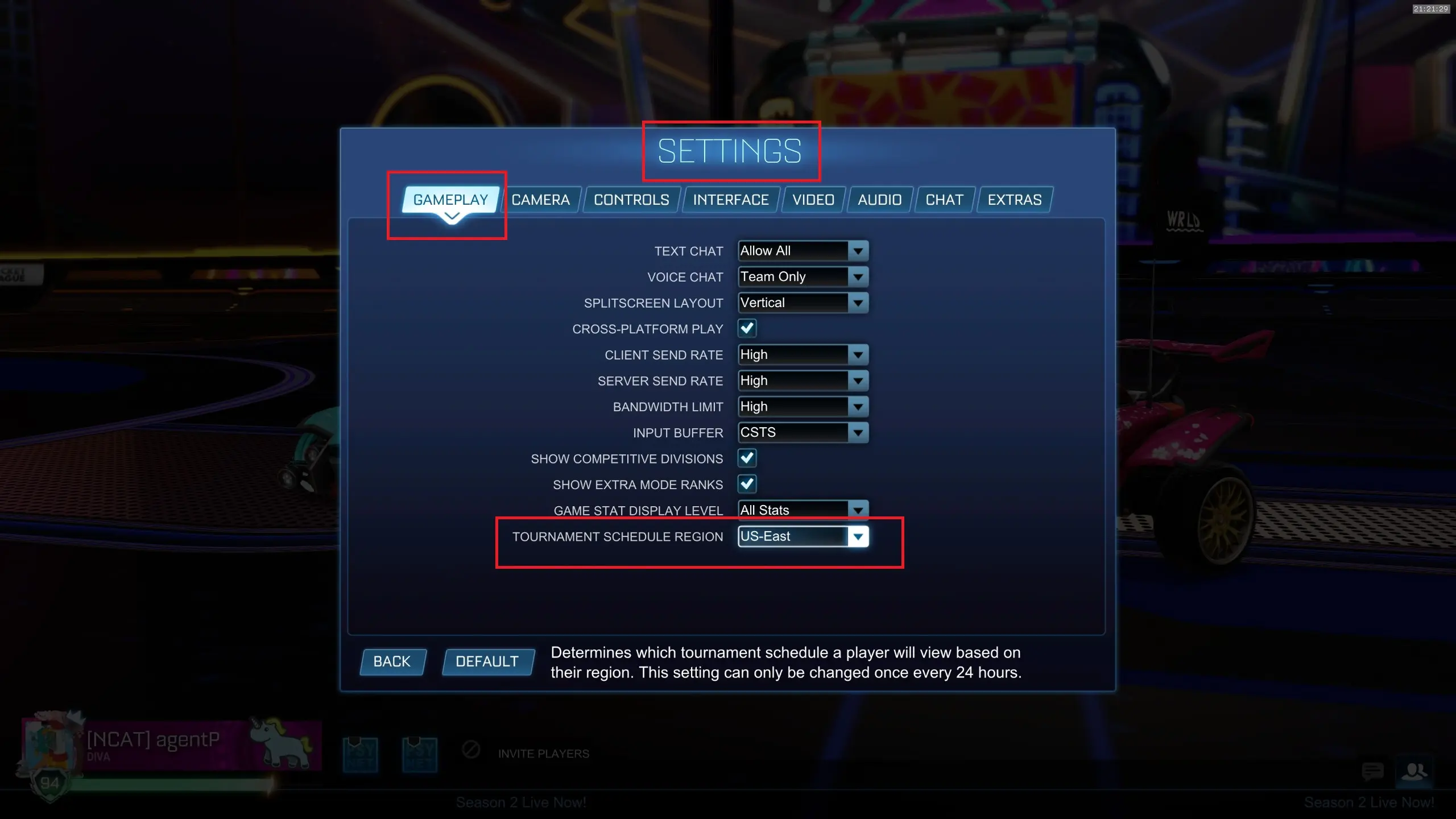
There’s a separate setting for tournaments: “Settings” — “Gameplay” — “Tournament Region.” You can change this setting no more than once every 24 hours.
Which region should players from Russia choose?
For the European part of Russia, start with Europe. In the Far East, you can compare connection speeds to Europe and East Asia. Base your decision on ping and stability over several matches: the geographically closest server doesn’t always provide the best results due to your ISP’s routing.
If you’re not sure what to choose, leave it set to “Recommended.” There is no separate “Russia” region in the official list.
Changing your server region does not change your account’s country or purchase terms.
How to Change the Language in Rocket League
The method depends on the platform. On PC, you can set the language through the launcher, and on consoles, through the system settings.
How to enable English in Rocket League via Epic Games
- Close the game and open the Epic Games launcher.
- Go to Settings.
- Find the Rocket League section.
- Enable “Additional Command Line Arguments.”
- Enter -language=INT.
- Launch the game.
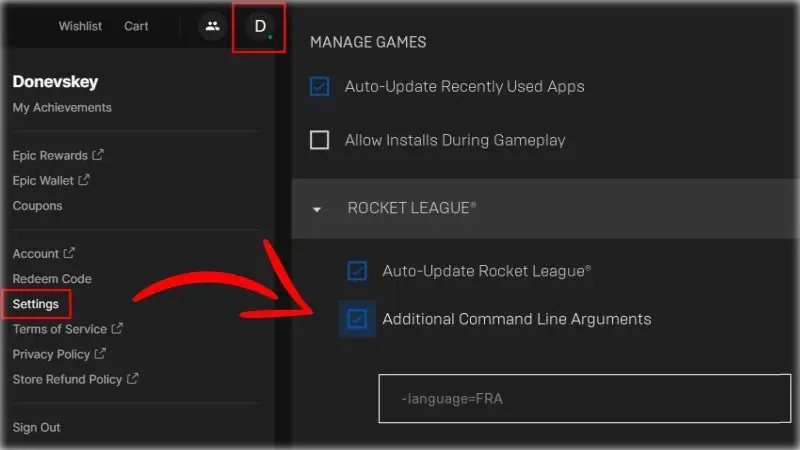
To switch back to Russian, replace the command with -language=RUS. If there are already other launch options in the field, add the command after a space. Do not leave two language selection commands at the same time.
How to Change the Language in Rocket League via Steam
- Open your Steam library.
- Right-click on Rocket League.
- Select “Properties.”
- Find the “Language” setting in the “General” section.
- Select Russian or English.
- Wait for the files to download, if the download starts, and then launch the game.
On PlayStation, Xbox, and Nintendo Switch, Rocket League’s language is changed through the system language settings. Restart the game after making the change.
Frequently Asked Questions (FAQ)
В лаунчере Эпик Геймс добавьте параметр -language=INT, а в Steam выберите английский в свойствах игры.
Для версии Эпик Геймс используйте -language=RUS. В Steam выберите русский в настройке языка.
Возможно, если соединение с новым сервером лучше. Сравните задержку в нескольких матчах.