How to Top Up Steam in Russia in 2026: All the Best Methods


Due to restrictions imposed by international payment systems, it has become more difficult to top up your Steam wallet directly. However, there are still methods that work. In this guide, we’ll explain how to top up your Steam account in Russia, what options are available in 2026, and which one offers the best value.
How to Top Up Your Steam Account in Russia
In 2026, Russian bank cards still cannot be used for direct payments on Steam. Instead, players top up their Steam Wallet through third-party services, gift cards, or foreign bank cards, and then purchase games using their account’s internal balance.
Several working methods are currently available:
- Steam top-up services—simply enter your account username, select the amount, and pay via SBP, a Russian bank card, or cryptocurrency; funds are usually credited within a few minutes;
- Steam gift cards—after purchase, the code is activated in your account, and the funds are credited to your Steam wallet. It’s important to choose a card that’s suitable for your account’s region.
- Foreign bank card/virtual wallet—not everyone has the option to get a card from another country, but wallet creation services have been around for decades and are popular among travelers.
Most players prefer top-up services and digital marketplaces that accept payments via Russian cards and the SBP payment system. These do not require changing your Steam region and allow you to quickly add funds to your account balance. Many of them charge a small fee—up to 10%.
If you’ve already changed your region, please note that some services apply a currency conversion rate that differs from bank rates. Be sure to read the service’s terms and conditions carefully when topping up.
Where to Top Up Steam in Russia
Ads for top-up services have been around for four years now. If you haven’t found your favorite and most cost-effective method yet, try one of these:
- Digital marketplaces: FunPay, Donatov Net, Plati Market, GGSel, Kupikod, and so on.
- Virtual wallets: Qiwi, WebMoney, and so on.
- Bank and mobile carrier apps: Alfa Bank, Beeline, MTS, Tele2, and so on.
- Gift cards: can be purchased on any digital marketplace. Be sure to check the activation region.
Top-up fees are usually 10%. If you find a more expensive option—even if it’s from a major bank—it’s better to try an alternative. On the digital marketplaces listed above, there are plenty of sellers with lower fees and lots of positive reviews. However, it’s up to you to decide which method works best for you.
How to Top Up Steam via a Bank or Mobile Carrier
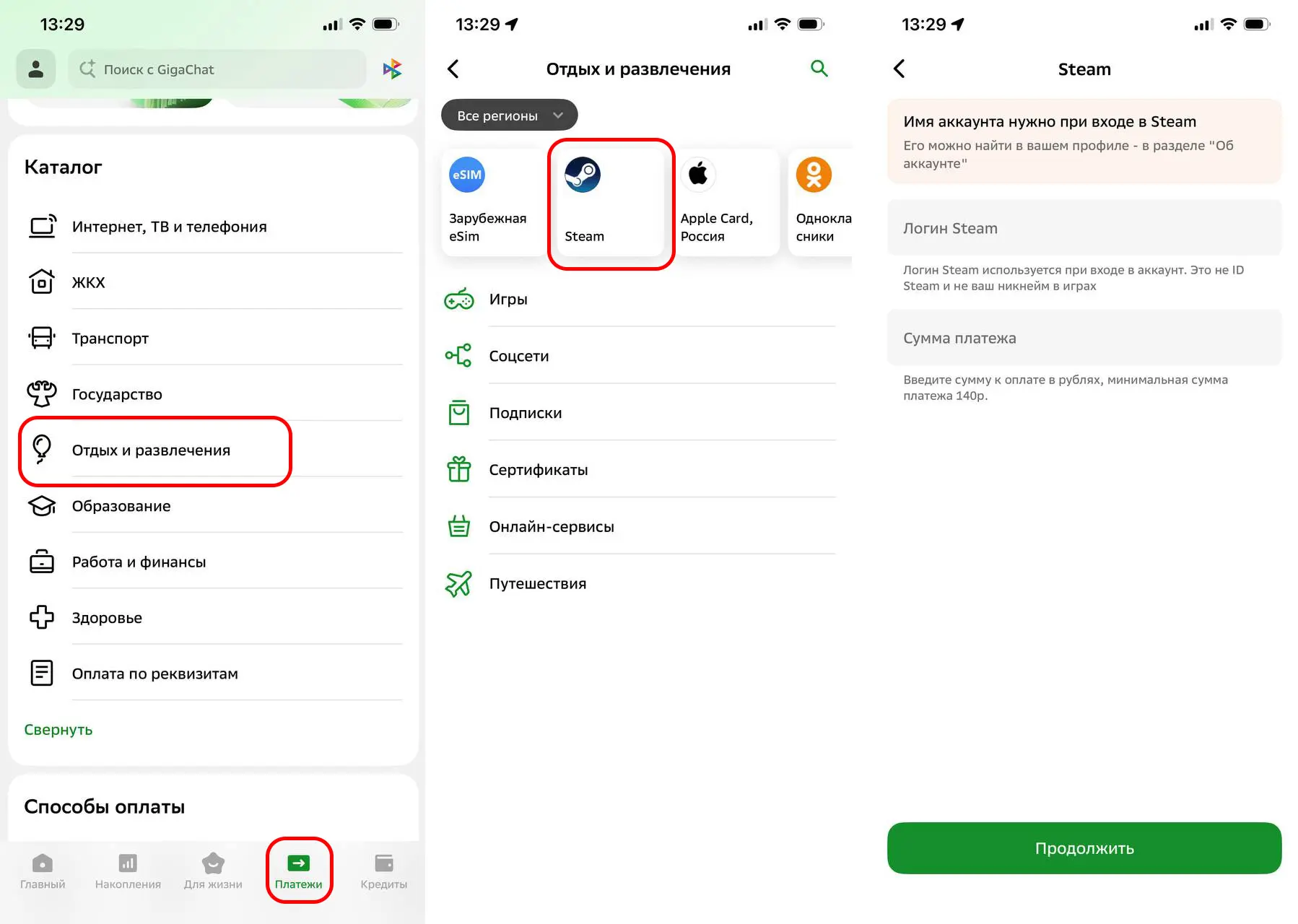
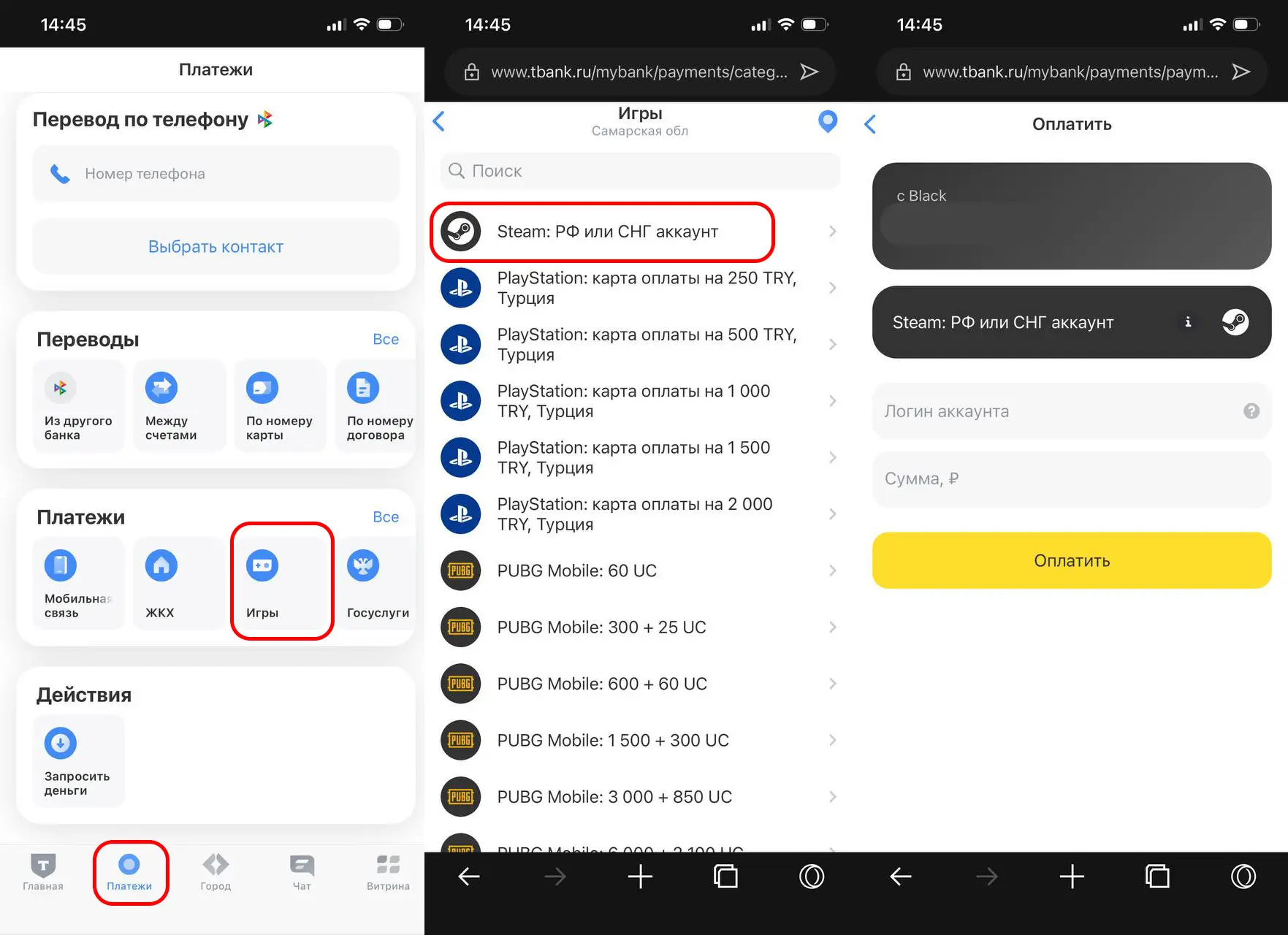
Many Russian mobile carriers and banks now offer their own top-up services. To top up your Steam account, open your bank’s app, go to “Payments,” and search for Steam.
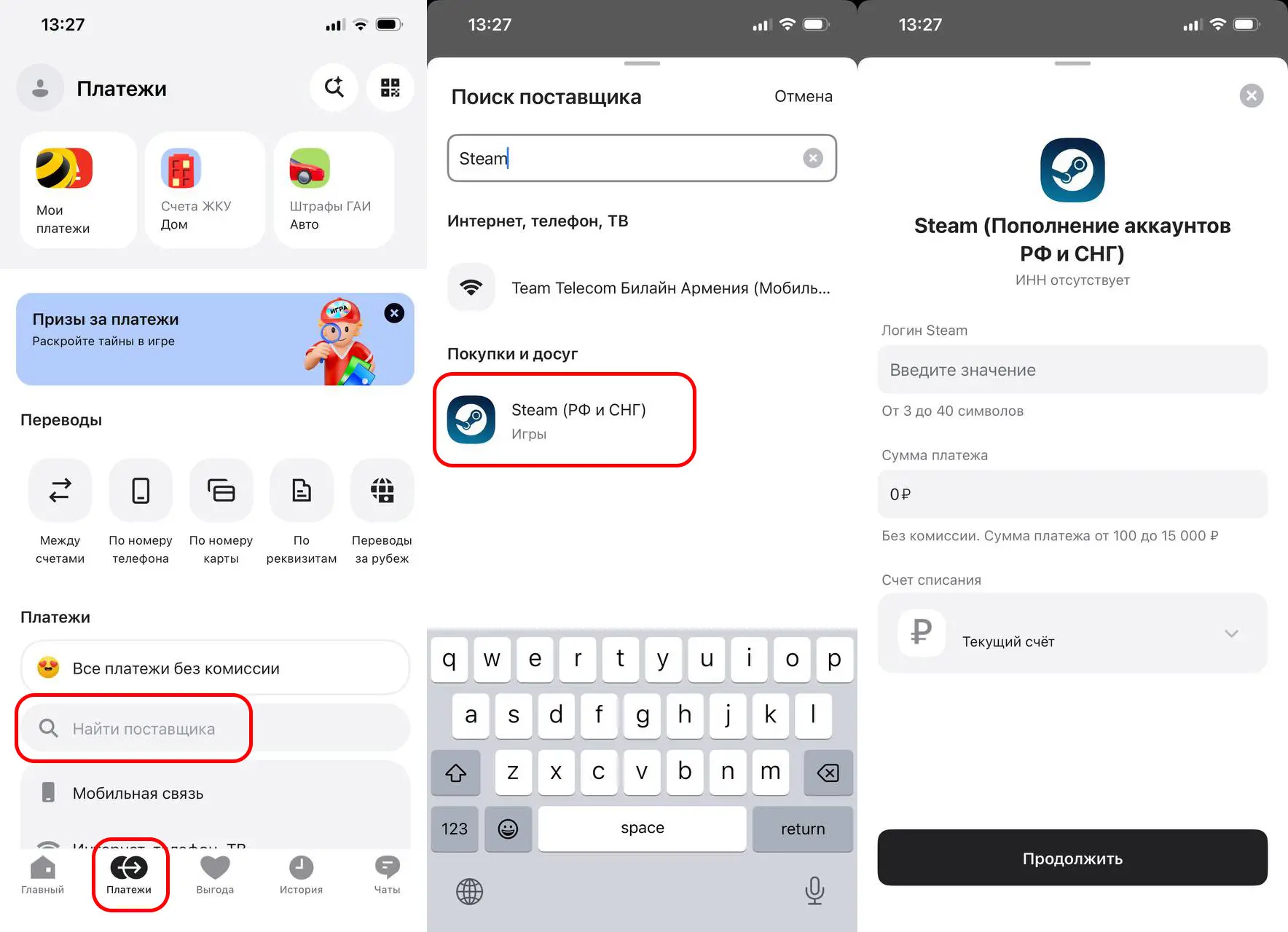
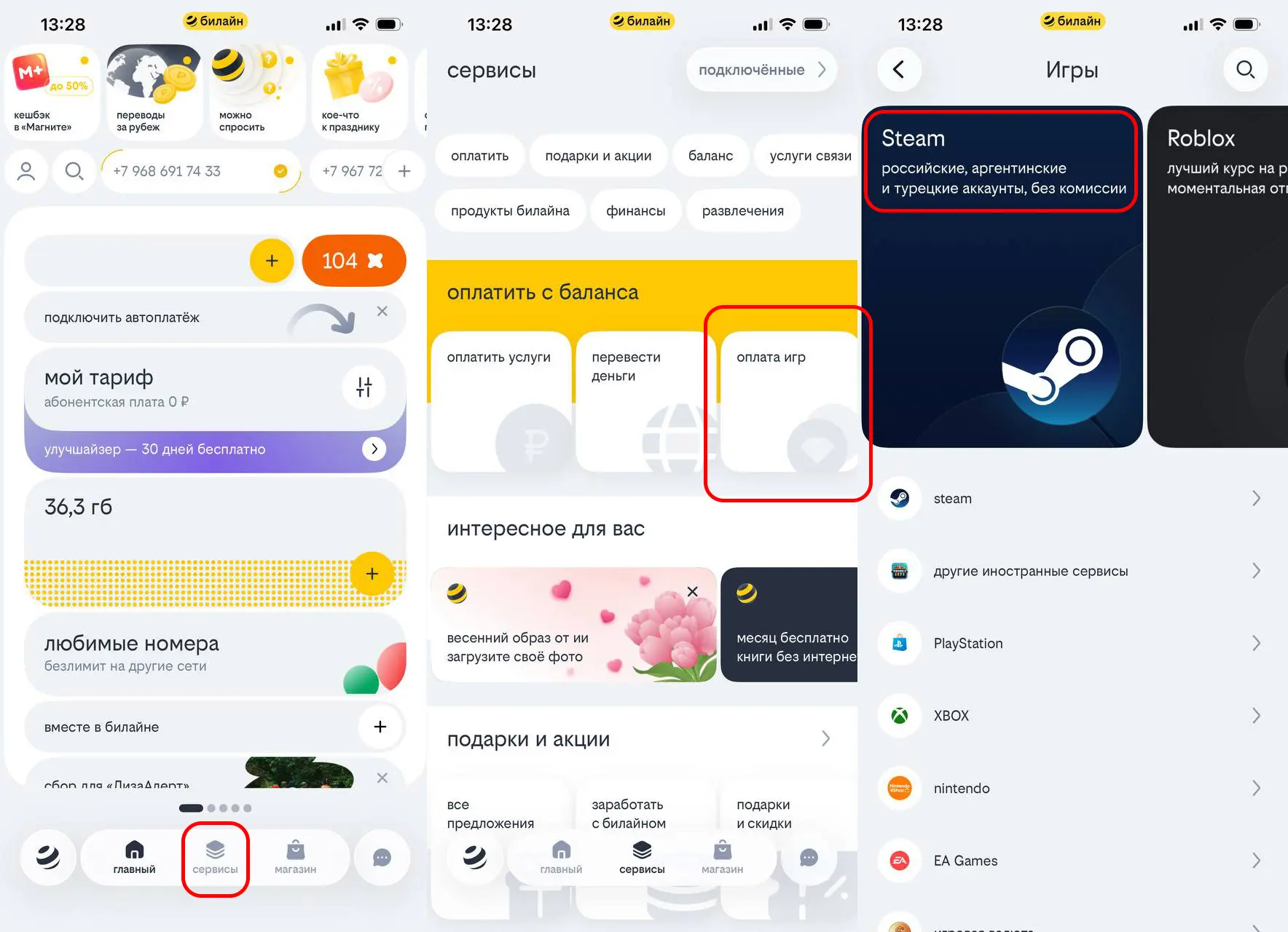
The process works the same way with mobile carriers. Go to “Payments” and top up your Steam account directly from your mobile phone balance.
The Best Way to Top Up Your Steam Wallet in Russia
For most users in Russia, the best way is to top up your Steam wallet through specialized services that accept credit cards and bank cards. These services allow you to deposit funds directly into your account, don’t require you to change your Steam region, and usually process payments within a few minutes.
Compared to gift cards and foreign bank cards, this option is simpler and more accessible. Before making a payment, it’s worth comparing exchange rates and fees across several services, as the final top-up amount may vary. It’s also recommended to use only trusted platforms with good reviews to avoid errors when transferring funds.
- Choose a trusted Steam top-up service.
- Enter your Steam account username (not your nickname) or a link to your profile.
- Enter the top-up amount.
- Pay for your order via SBP, a Russian bank card, a virtual wallet, or another available method.
- Wait for the funds to be credited to your Steam wallet and use them to purchase games, add-ons, or in-game items.
Your login is the information you use to sign in to your account, not your nickname. You can find your login in the top-right corner of Steam by clicking on your nickname. You’ll see your login in the “About Account” section. This is the one you need to enter in all payment forms.
Why the funds aren’t showing up
In most cases, funds are credited to your Steam wallet within a few minutes, but sometimes the process may take longer. This may be due to high traffic on the payment service, additional payment verification, or temporary technical issues.
If the funds haven’t appeared in your balance, first make sure you’ve entered your username or Steam profile link correctly, and check the order status on the top-up service. If more time has passed than indicated at the time of payment, contact the service’s support team and provide your receipt or order number.
Frequently Asked Questions (FAQ)
Напрямую — нет. Однако российские карты можно использовать для оплаты через сервисы пополнения, которые затем зачисляют деньги на кошелёк Steam.
Самый удобный вариант для большинства пользователей — сервисы пополнения с оплатой через СБП или банковскую карту РФ.
Обычно наиболее выгодными оказываются сервисы с минимальной комиссией, однако перед оплатой стоит сравнить курс и итоговую сумму зачисления.
Да, размер комиссии зависит от выбранного сервиса, способа оплаты и текущего курса валют.
В большинстве случаев средства поступают на кошелёк Steam в течение нескольких минут, но иногда зачисление может занять до нескольких часов.