Apex Legends Errors: Won’t Launch, Can’t Connect to the Server, and Loads Endlessly


Apex Legends may freeze on launch, crash without an error, or fail to connect to servers. Common issues also include messages like “Connection timed out,” endless loading, and various error codes. In this guide, we’ll break down why Apex Legends isn’t working and what to do if the game won’t launch or you can’t connect to the server.
Apex Legends: Connection Timeout
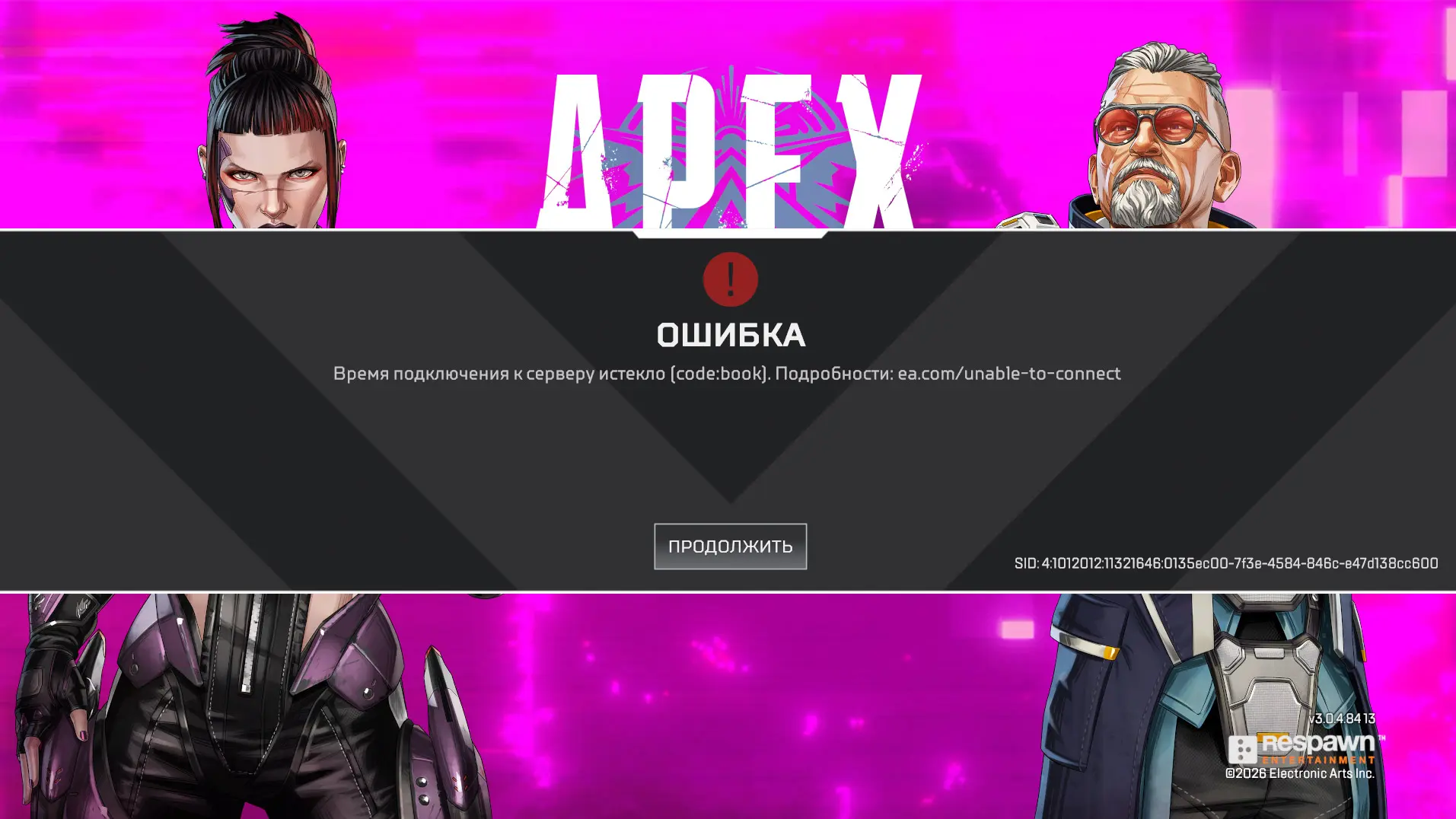
The “Connection to the server timed out” error in Apex Legends appears when the game is unable to establish a connection with the server in time. A similar issue is indicated as “Unable to connect [code:clock]”: the servers stop waiting for the client to connect. This can be caused by Apex Legends server outages, an unstable internet connection, high ping, or issues with the selected data center.
If the connection time has expired in Apex Legends, try the following:
- Check the status of Apex Legends servers on the official website. If there’s a widespread outage, you’ll just have to wait for the servers to come back online.
- Completely restart the game and the Steam/EA app.
- Restart your computer and router.
- Check your internet speed and stability. If possible, connect your computer to the router via an Ethernet cable instead of Wi-Fi.
- Switch data centers. On the game’s home screen, open the list of data centers and select a server with lower ping and packet loss.
- Check for game updates.
If the “Apex Legends connection timed out” message keeps appearing even though the servers are up, the problem is most likely related to the connection between your computer and the game server. You should check your ping and packet loss, and try a different data center.
Apex Legends Won’t Connect to the Server
If Apex Legends won’t connect to the server, first check the status of EA’s servers. In the event of a widespread outage, you won’t be able to fix the problem on your own—you’ll need to wait for the game to come back online.
If the servers are up but you still can’t connect to Apex Legends, restart the game and the Steam client or EA app, then verify the integrity of the game files. Also, make sure your antivirus software and Windows firewall aren’t blocking the game’s internet connection.
If you see a message stating that the connection time to the server has expired, follow the steps from the previous section: check your connection and select a different data center with lower ping and packet loss.
Apex Legends Stuck Loading
If Apex Legends gets stuck on an endless download, try the following:
- Completely restart the game and Steam or the EA app.
- Share your phone’s internet connection and try logging into Apex Legends via your mobile network.
- If the game launches via mobile data, the problem is most likely related to your home connection or your ISP’s routing.
- You can try using an IP-changing program. Russian players report that this helps bypass the endless loading loop, though results may vary depending on your ISP.
- If switching networks doesn’t help, verify the integrity of the game files and close any background apps.
This check is especially important for players in Russia: there are numerous reports on the EA and Steam forums about Apex Legends taking forever to load specifically for Russian users, and about the issue being tied to specific internet service providers.
Apex Legends Crashes Without an Error
If Apex Legends crashes to the desktop without an error message, first check the game files and your graphics card driver.
Try the following:
- Verify the integrity of the Apex Legends files in Steam or perform a repair in the EA app.
- Update your graphics card driver. If Apex started crashing after a driver update, perform a clean reinstallation or roll back to the previous version.
- Close overlays, monitoring programs, and other background applications.
- Check to see if your antivirus is blocking the game.
- Restart your computer and launch Apex again.
If Apex Legends crashes without an error immediately after a new patch is released, the problem may be directly in the hands of the developers. For example, after some updates, users reported identical crashes en masse even after verifying files and reinstalling the game.
Why Apex Legends Won’t Launch

If Apex Legends won’t launch at all or closes during startup, the cause may be corrupted files, drivers, Easy Anti-Cheat, conflicting software, or an error following a game update.
If Apex Legends won’t launch on Steam, go to “Library” → Apex Legends → “Properties” → “Installed Files” → “Verify Game Files.” Also, try running the game without third-party overlays or programs.
If Apex launches but gets stuck on the loading screen or can’t connect to the server, don’t reinstall the game right away. Try the solutions from the previous sections on endless loading and connection issues: for Russian users, the problem is sometimes due to the connection or DNS.
Apex Legends Error 0x8000002
Error 0x8000002 in Apex Legends is related to the Easy Anti-Cheat security system. When you launch the game, a “Badware Detected / Integrity Error 0x8000002” message appears: the anti-cheat system detects a third-party program, driver, or other component that could potentially interfere with the game’s operation. However, this error can be a false positive and may appear even for players who aren’t using cheats.
- Close any programs running alongside the game: utilities for virtual controllers, scripts, monitoring tools, overlays, and virtual drives.
- Verify the integrity of Apex Legends files via Steam or the EA app.
- Clear the EA app cache or the Steam download cache.
- Restart your computer and launch the game again.
- If you have DAEMON Tools installed, uninstall the program and any remaining drivers. This has helped players on the forum.
- If nothing else works, open a Command Prompt as an administrator, run `DISM /Online /Cleanup-image /Restorehealth`, followed by `sfc /scannow`, and then restart your PC. This method is recommended on the EA forum for repairing corrupted Windows system files.
If error 0x8000002 appeared immediately after the Apex Legends update, the problem may also be related to anti-cheat changes: Players have repeatedly complained that the error occurred on a massive scale after the patch among players whose game had been running normally before the update.
Will Apex Legends work in Russia in 2026?
Apex Legends will be available in Russia in 2026, though Russian players may experience connection issues. The game has not been blocked by Roskomnadzor: in May 2026, the agency specifically stated that it had no plans to block Electronic Arts games. At the same time, EA itself lists Russia among the regions where some of the company’s games and services may be unavailable due to existing restrictions.
Therefore, Apex Legends in Russia may launch normally with one internet service provider but freeze during connection with another. If you encounter a problem, try using mobile data or an IP-changing program—other methods are discussed in the sections above.
Frequently Asked Questions (FAQ)
Причиной могут быть сбои серверов, нестабильный интернет или проблемы с выбранным центром данных.
Проверьте серверы, перезапустите роутер и смените центр обработки данных.
Проблема может быть связана с серверами, файлами игры или интернет-соединением.
Проверьте файлы игры, обновите драйверы и отключите конфликтующие фоновые программы.
Ошибка связана с проверкой целостности Anti-Cheat и может возникать из-за конфликтующего ПО или драйверов.