How to Change Your Region on Google Play on Android in 2026


Your Google Play region determines which apps are available in the store, the currency in which prices are displayed, and which payment methods you can use. If the app you want isn’t available in your region, you don’t necessarily need to create a new account—sometimes it’s enough to change your Google Play country. In this guide, we’ll explain how to do this and what restrictions apply.
How to Change Your Google Play Region
If Google detects that you’re in a different country, you can change your region through your account settings. However, Google has recently started monitoring region changes more strictly, so you can no longer simply connect using an IP address from another country.
- Connect to an IP address from the country you want to switch to. You’ll need a SIM card from that country.
- Open “Settings,” go to “Apps,” select “Google Play Store,” and choose “Storage.” Clear the cache there.
- Clear the cache for Google Play Services in the same way.
- Create a new Google account.
- On your phone, access this Google Play account: “Settings” → “Passwords & Accounts” → “Add Account.”
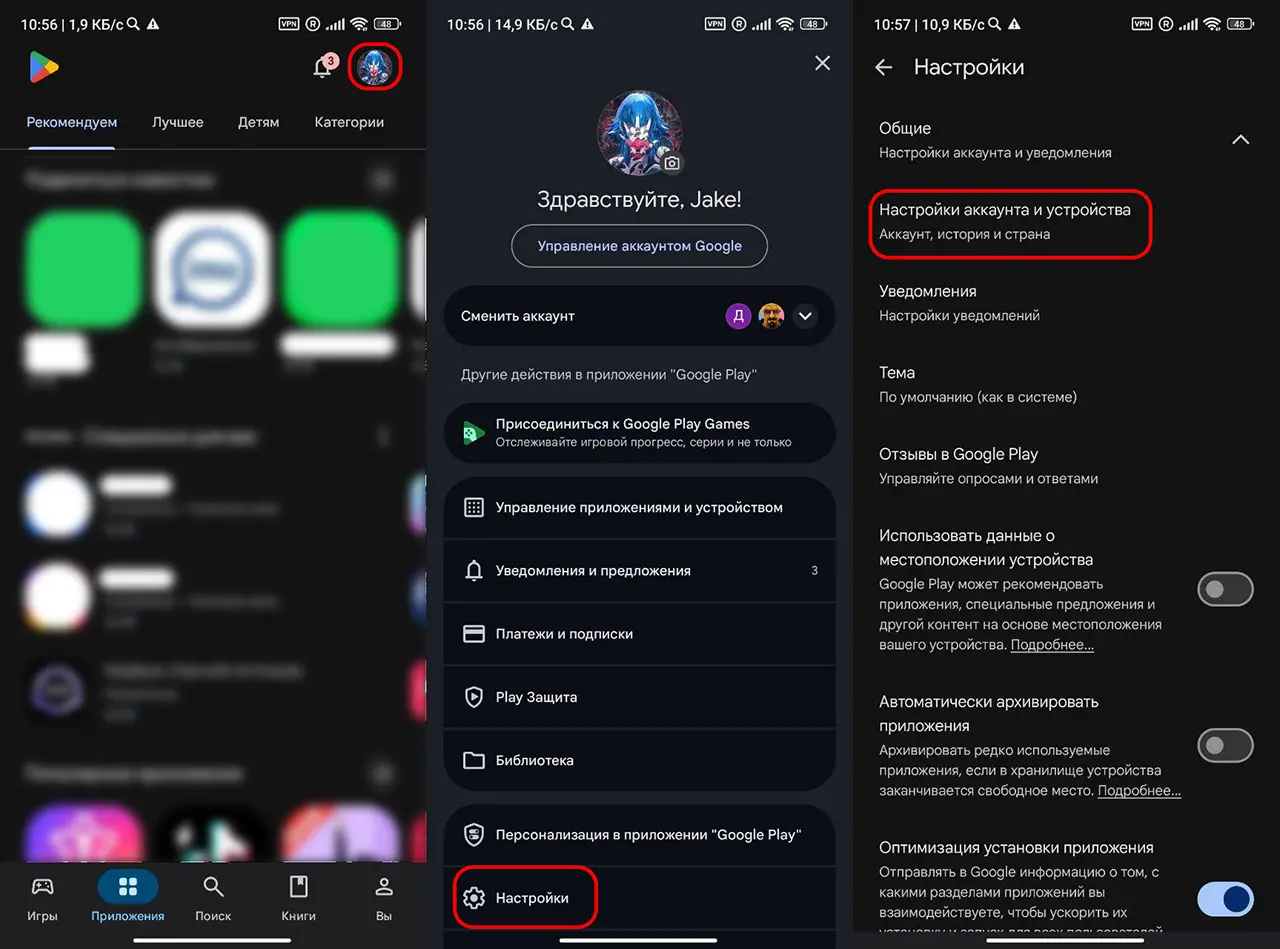
- Open the Play Store and switch to the new account in the top-right corner.
- Go to “Settings,” “General,” “Account & Device Settings,” “Country & Profiles.” If this menu isn’t there, you’ll need a new app to change your IP address.
- If the country appears and Google prompts you to add a payment method, add one. Fake cards won’t work.
- If everything went well, your region will change to the new country.
After installing the app, you can select your primary Google account again in the Play Store. Most apps will continue to work as usual. To update some apps, you may need to select the account you used to install them.
After changing your region, the available apps, store prices, currency, payment methods, and the availability of certain subscriptions and services may change. However, your installed apps, photos, contacts, and other account data will not disappear.
Changing Your Region Without a Foreign Credit Card
If you don’t have a card from another country, you can use intermediaries on digital marketplaces. Changing your region to Turkey, the U.S., Kazakhstan, or other popular countries will cost 150–200 rubles.
Choose a seller based on sales volume and reviews. The reviews should not all be identical, nor should they have been posted at the same time. After transferring your account data and completing the transaction, be sure to change your password.
Why Can’t I Change My Region?
The most common reasons may be:
- less than a year has passed since the last region change;
- Google hasn’t recognized your connection as a new location;
- a suitable payment method has not been added;
- Your account is part of a family group;
- Google Play is not officially available in the selected country.
Frequently Asked Questions (FAQ)
Официально — не чаще одного раза в 12 месяцев.
Да. Многие пользователи используют отдельный аккаунт исключительно для скачивания приложений из других регионов.
Нет. Можно оставить основной аккаунт для Gmail, фотографий и синхронизации, а второй использовать только в Play Маркете.
Да. Уже установленные приложения останутся на устройстве.
Попробуйте войти с подключением из нужной страны, создать новый аккаунт Гугл или подождать — иногда Гугл показывает новый регион не сразу.