The Best Sights in Marvel Rivals: Settings, Codes, and Player Configurations

A properly configured crosshair in Marvel Rivals helps you lock onto targets faster and makes shooting much more comfortable. In the game, you can change the shape, size, color, and other settings of your crosshair, as well as import pre-made settings using codes. In this guide, we’ll show you the best crosshairs for different heroes and share settings from popular players.
How to Change Your Crosshair in Marvel Rivals
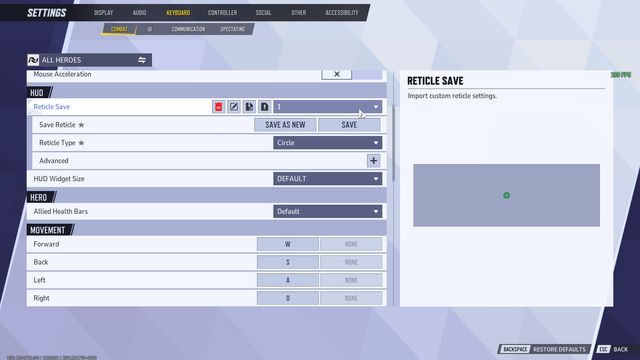
You can customize your crosshair in Marvel Rivals through the game settings. If you want, you can create your own crosshair from scratch or import a pre-made code from another player.
- Open “Settings.”
- Go to the “Keyboard” tab (or “Controller” if you’re playing with a gamepad).
- Open the “Combat” section.
- Scroll down to the HUD section.
- In the Reticle Save section, select a pre-made reticle or create a new one.
In the editor, you can change virtually all reticle settings: shape, size, color, transparency, line thickness, spacing between lines, outline, and animation. If necessary, you can save a separate reticle for each hero by switching from the “All Heroes” option to the desired character.
If you have a reticle code, click “Import Save,” paste it into the window that appears, and confirm the import. After that, all settings will be applied automatically. On PC, direct import is supported, but on consoles, you’ll need to configure the reticle settings manually.
Best Aim Settings in Marvel Rivals
There is no one-size-fits-all crosshair for all heroes in Marvel Rivals. Small, precise crosshairs work best for characters with hit-scan attacks, while larger crosshairs—which are easier to track during fast-paced battles—are better suited for melee heroes or those who use projectiles.
For heroes with hit-scan attacks (The Punisher, Hela, Cyclops, Black Widow):
- Type: dot or small crosshair;
- Size — small;
- color—green, blue, or white;
- opacity — 100%.
For heroes with projectiles (Squirrel, Namor, Rocket):
- type — small cross with a dot in the center;
- size — medium;
- it is recommended to leave a small gap between the lines for better projectile flight control.
For melee heroes (Spider-Man, Wolverine, Venom, Iron Fist):
- Type — a circle or a large circle with a dot;
- size — medium or large;
- Color: bright, clearly visible against any background.
For most players, a small green or blue crosshair without any extra elements is the best choice. It doesn’t obscure the enemy model, is clearly visible on almost all maps, and works well for most ranged heroes.
Marvel Rivals Crosshair Codes
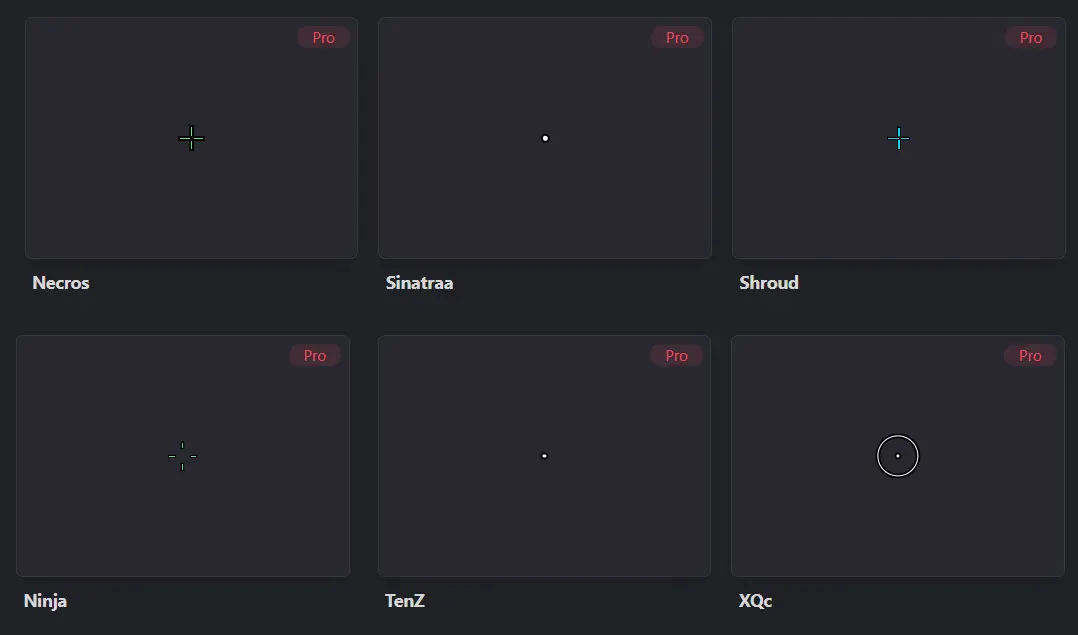
You can adopt the crosshairs used by popular players and streamers by copying their codes.
| Player | Sight |
| Necros | 2;0.0;10.0,10.0,10.0,10.0;100.0,100.0,100.0,0.0;55.0,76.0,55.0,0.0;99.0,100.0,99.0,0.0;0.0, 0.0, 0.0, 0.0; 6.0, 3.0, 6.0, 6.0;14.02;100.0,100.0,100.0,0.0;0.0;3,3,3,3;1.0,1.0,1.0; |
| Sinatraa | 3;1;14.0,14.0,14.0,14.0;100.0,100.0,100.0,100.0;50.0,50.0,50.0,50.0;100.0,100.0,100.0,100.0;0.0,0.0,0.0,0.0;33.0,33.0,33.0,33.0;30.0;100.0, 100.0, 100.0, 100.0; 0.0; 0, 0, 0, 0; 1.0, 1.0, 1.0; |
| Shroud | 2;1;10.0,12.0,10.0,0.0;100.0,100.0,100.0,0.0;50.0,50.0,50.0,50.0;100.0,100.0,100.0,100.0;0.0,0.0,0.0,0.0;33.0,0.0,33.0,33.0;16.0;100.0, 100.0, 100.0, 0.0; 0.0; 4, 4, 4, 4; 1.0, 1.0, 1.0; |
| Ninja | 2;1;10.0,10.0,10.0,0.0;100.0,100.0,100.0,0.0;50.0,50.0,50.0,50.0;100.0,100.0,100.0,100.0;0.0,0.0,0.0,0.0;33.0,13.0,33.0,33.0;8.0;100.0, 100.0, 100.0, 0.0; 0.0; 3, 3, 3, 3; 1.0, 1.0, 1.0; |
| TenZ | 3;1;10.0,10.0,10.0,10.0;100.0,100.0,100.0,100.0;50.0,50.0,50.0,50.0;100.0,100.0,100.0,100.0;0.0,0.0,0.0,0.0;33.0,33.0,33.0,33.0;30.0;100.0, 100.0, 100.0, 100.0; 0.0; 0, 0, 0, 0; 1.0, 1.0, 1.0; |
| xQc | 0;1;10.0,10.0,10.0,10.0;100.0,100.0,100.0,100.0;50.0,50.0,50.0,50.0;100.0,100.0,100.0,100.0;0.0,0.0,0.0,0.0;33.0,33.0,33.0,33.0;30.0;100.0, 100.0, 100.0, 100.0; 0.0; 0, 0, 0, 0; 1.0, 1.0, 1.0; |
You can also set up unusual and meme-inspired crosshairs: in the shape of flowers, red dots, the sun, Jeff’s bubble, and so on.
Best Settings for Marvel Rivals
Your aim is influenced not only by the crosshair but also by the right settings. If you want consistent FPS and minimal input lag, it’s best to use competitive settings. They reduce the number of visual effects, making it easier to spot enemies during combat.
Recommended graphics settings:
- Vertical Sync — Off
- NVIDIA Reflex — On + Boost (if supported);
- Shadows — Low;
- Effects — Low;
- Post-processing — Low;
- Textures — Medium (or Low on a low-end PC);
- FPS cap — set to your monitor’s refresh rate or slightly below it.
Control settings:
- Mouse DPI — 800 (a common setting among gamers);
- In-game sensitivity — 4–6 (adjust to your preference);
- Mouse acceleration — turn off;
- A small green or blue crosshair without any extra elements.
If your computer can’t handle the game, reduce the rendering scale to 75%, disable heavy graphical effects, and use only your screen’s native resolution. In most cases, this will significantly improve performance without a major loss of image quality.
Frequently Asked Questions (FAQ)
Откройте «Настройки» — «Клавиатура» (или «Контроллер») — «Бой» — HUD — Reticle Save, где можно создать или изменить прицел.
Да, на ПК можно импортировать готовый код через кнопку Import Save, а на консолях настройки придётся вводить вручную.
Для большинства игроков оптимальным считается небольшой зелёный или голубой прицел с точкой или тонким крестом, который не перекрывает модель противника.
Да, многие профессиональные игроки и популярные стримеры публикуют свои коды прицелов, которые можно импортировать в игру на ПК.
На ПК настройки игры хранятся в файле MarvelUserSetting.ini в папке %localappdata%u005cMarvelu005cSavedu005cSavedu005cConfigu005c..., где также сохраняются пользовательские прицелы.