How to change your iPhone’s region—how to create a second Apple ID for the App Store and download apps


If the app you want isn’t available in the Russian App Store, you don’t have to change your primary Apple ID. A more convenient way is to create a second account with a different region and use it exclusively for the App Store. Your iCloud, photos, contacts, backups, and subscriptions on your main account will remain unchanged. Apple officially supports using one Apple ID for iCloud and another for purchases and app downloads.
How to Create a Second Apple ID
- Go to the Apple website and create a new Apple ID.
- During registration, select the desired country (for example, Kazakhstan, Turkey, the U.S., or another country).
- Verify your email address and phone number.
- If necessary, enter your payment information and the address for the selected country. For free apps, you often don’t need to specify a payment method.
It’s important to remember that if you plan to make a purchase, you’ll need a credit card issued in that region. However, if you only plan to download free apps, you don’t need to provide a payment method.
How to Add a Second Account to the App Store Only
You don’t need to change your primary Apple ID.
- Open “Settings” and tap your name.
- Tap “Content & Purchases.”
- Select “Sign Out.”
- Then tap “Sign In” and sign in with your second Apple ID.
- Open the App Store and download the apps you want.
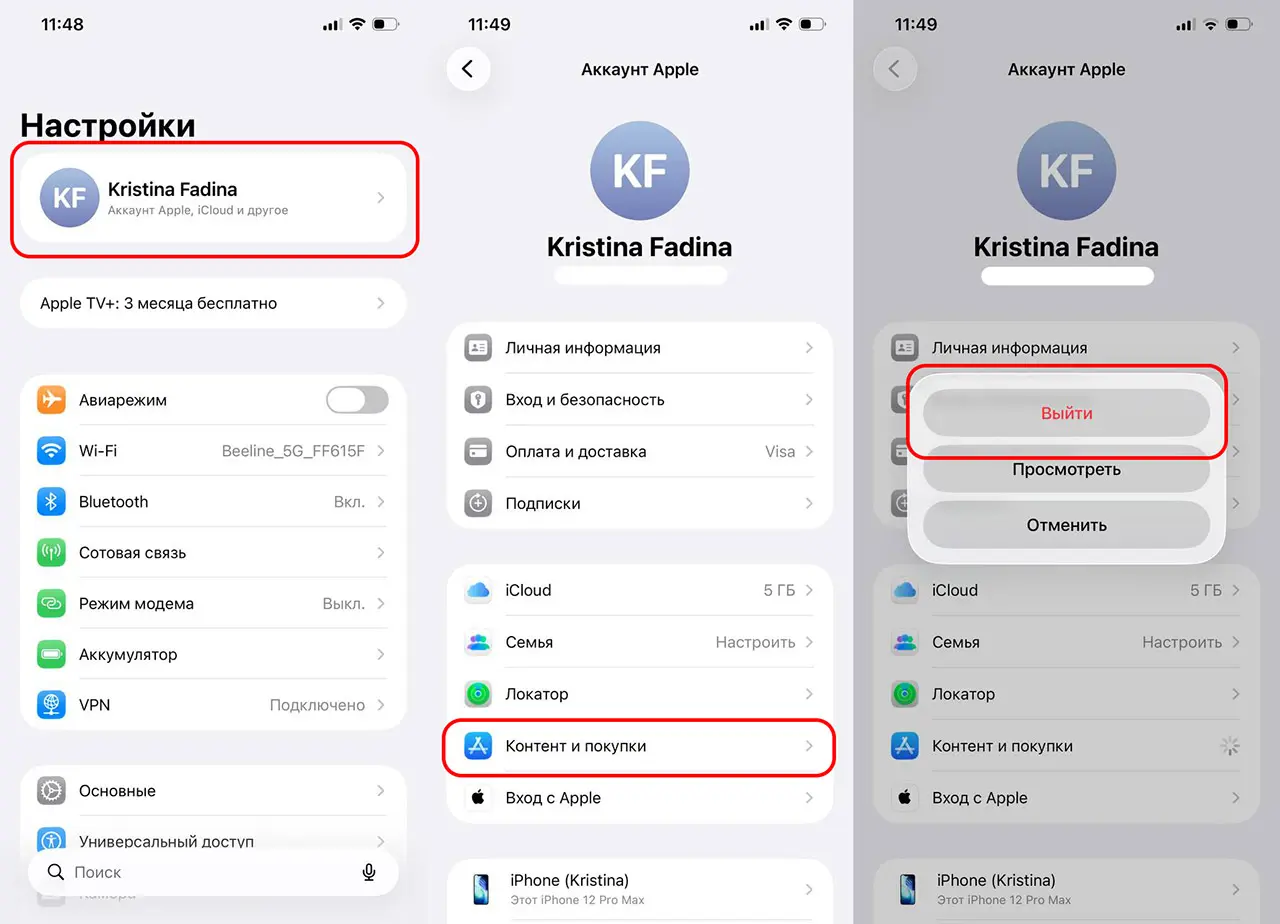
Your main iCloud account will remain active: photos, messages, backups, FaceTime, iMessage, and Find My will continue to work through it. The only thing that changes is the account used to download apps and make purchases in the App Store.
Do I need to keep switching back to the second account?
No. After installing an app, you can sign back into the App Store with your primary Apple ID. The app you’ve already downloaded will continue to work. If an update is released in the future, you may need to sign in again with the Apple ID you used to install the app.
What will change after adding a second Apple ID?
Using a second account exclusively for the App Store does not affect the data in your primary profile. Your photos, contacts, iCloud Drive, backups, messages, FaceTime, and subscriptions associated with your primary Apple ID will remain unchanged. The only thing that changes is the account used to download and update apps.
Frequently Asked Questions (FAQ)
Нет. Выходить из iCloud не нужно — достаточно сменить аккаунт только в разделе «Контент и покупки».
Да. Один может использоваться для Айклауд, второй — только для Аппстора и покупок.
Нет. Они останутся на основном Apple ID, который используется для Айклауда.
Только если потребуется обновить приложение или скачать новое из другого региона.
Да. Достаточно выйти из него в разделе «Контент и покупки» и снова войти под основным аккаунтом.